Disclosure: This guide contains affiliate links. If you buy through them, BunyanSafe may earn a commission at no extra cost to you.
A portable power station can keep selected devices running during an outage. Choose one by the power your devices require and the hours you need, rather than by the biggest number on the box. This guide compares five current listings for a winter backup plan.
We compared product-listing titles available through approved affiliate tools and public energy-storage guidance. We haven’t hands-on tested these stations or measured runtime. All specifications below come from listing titles; verify the exact manual before purchase.
Quick picks
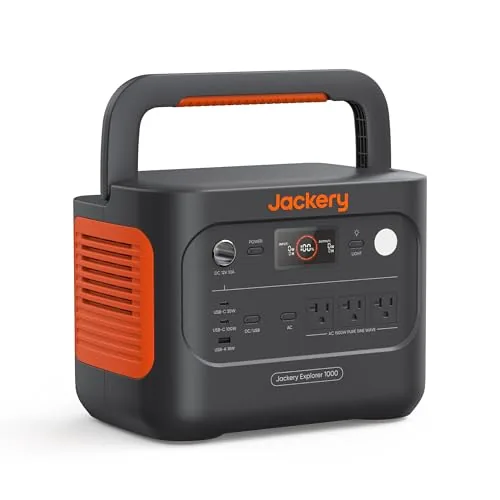
- Jackery Explorer 1000 v2: listed 1,070Wh and 1,500W.
- Anker SOLIX S2000: listed 2,010Wh and 1,500W.
- Anker SOLIX C1000 car-cable bundle: listed 1,056Wh.
- BLUETTI Elite 300: listed 3,014.4Wh.
- UDPOWER S1200: listed 1,200W output and 1,800W surge.
Watts and watt-hours answer different questions
Watts describe power: can a station support your device’s load? Watt-hours describe stored energy: how much energy is available before recharge? The Department of Energy distinguishes power capacity from energy capacity in its energy-storage explanation. You need to compare both.
Capacity divided by a constant load gives an ideal runtime calculation. Real runtime is shorter because of conversion losses, idle consumption, temperature, and device behavior. For illustration, a constant 50W load for eight hours requires 400Wh before those losses. This isn’t a tested result for any model here.
Comparison at a glance
| Model | Listed energy | Listed power | Check first |
|---|---|---|---|
| Jackery Explorer 1000 v2 | 1,070Wh | 1,500W | Ports and loads |
| Anker SOLIX S2000 | 2,010Wh | 1,500W | Weight and recharge |
| Anker SOLIX C1000 bundle | 1,056Wh | Verify manual | Exact version |
| BLUETTI Elite 300 | 3,014.4Wh | Verify manual | Transport needs |
| UDPOWER S1200 | Verify manual | 1,200W; 1,800W surge | Capacity and surge duration |
1. Jackery Explorer 1000 v2
With a listed 1,070Wh capacity and 1,500W output, this is a starting point for a few essentials through an outage. You can use both numbers in your worksheet, then check the ports and startup requirements of the devices you want to run.
We don’t have measured usable AC energy for this model, so the examples below aren’t Jackery runtime promises. Skip it if your plan is overnight electric heating and you haven’t calculated that much larger energy requirement.

- Powerful yet Compact: Boasting a 1,500W AC output and a 3,000W surge peak, the Solar Generator 1000 V2 can power multipl…
- One Hour Fast Charging: Charge your Explorer 1000 v2 Portable Power Station from 0% to 100% battery level in just one ho…
- 10 Year Lifespan: The Explorer 1000 v2 portable power station is equipped with a durable LFP battery, maintaining over 7…
Confirm the exact v2 package and accessories. Don’t assume another Explorer 1000 listing has identical specifications or included solar panels.
2. Anker SOLIX S2000
The S2000 lists 2,010Wh and 1,500W: more nominal energy than the Jackery, with the same stated output. Put it on your shortlist if your load calculation calls for additional stored energy, rather than a higher-power appliance.
That distinction is the main trade-off here. A bigger battery doesn’t let you ignore the output limit, and it isn’t the right purchase if you haven’t checked the weight, outlets, and recharge plan.
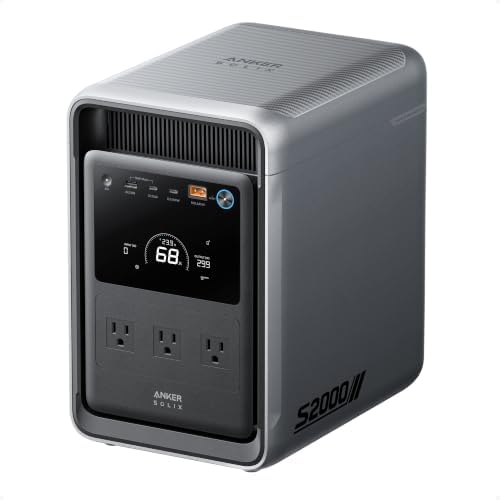
- 𝐔𝐩 𝐭𝐨 𝟑𝟓-𝐇𝐨𝐮𝐫 𝐅𝐫𝐢𝐝𝐠𝐞 𝐁𝐚𝐜𝐤𝐮𝐩: With 6W idle power draw and 10% higher efficiency, this power station runs 20% longer than …
- 𝟏𝟎,𝟎𝟎𝟎-𝐂𝐲𝐜𝐥𝐞 𝐋𝐅𝐏 𝐁𝐚𝐭𝐭𝐞𝐫𝐲: Powered by 314Ah LFP cells, S2000 has a 15-year lifespan, equivalent to 10,000 charge cycles.
- 𝐒𝐦𝐚𝐥𝐥𝐞𝐬𝐭 𝐚𝐧𝐝 𝐋𝐢𝐠𝐡𝐭𝐞𝐬𝐭 𝟐𝐤𝐖𝐡 𝐏𝐨𝐰𝐞𝐫 𝐒𝐭𝐚𝐭𝐢𝐨𝐧: 30% smaller and 25% lighter than the industry average, this power station meas…
Look up weight and dimensions before choosing a location upstairs. Transport matters if you’ll move the unit during an outage.
3. Anker SOLIX C1000 with car charging cable
This 1,056Wh C1000 package includes a car charging cable, which makes it worth comparing if supported vehicle charging is part of your plan. Check the allowed input and charging time before deciding that a vehicle will keep up with your household loads.
The cable is a bundle benefit, not evidence of fast charging. If you’re shopping for the C1000 Gen 2, this isn’t a substitute: match the exact version, manual, and accessories before ordering.
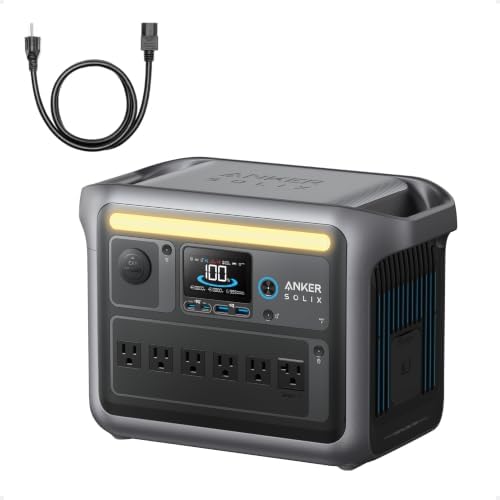
- Charge Up in a Flash: Achieve 80% battery capacity in just 43 minutes with the Anker SOLIX C1000’s UltraFast recharging …
- A Decade of Power: Trust in a decade-long journey with the Anker SOLIX C1000 Portable Power Station, featuring exception…
- Powerhouse Versatility: The Anker SOLIX C1000’s SurgePad technology delivers a massive 2400W output, enabling 99% of app…
Use only supported charging connections. Don’t leave a vehicle running in an attached garage to recharge equipment.
4. BLUETTI Elite 300
The Elite 300 has the largest stated capacity in this comparison, at 3,014.4Wh. It belongs on your shortlist when a smaller energy budget won’t cover the devices and hours in your worksheet.
Don’t let that number settle the purchase by itself. We still need the exact output, weight, and outlet limits from its manual. If you need a connection to home circuits, a portable listing alone isn’t an installation plan.
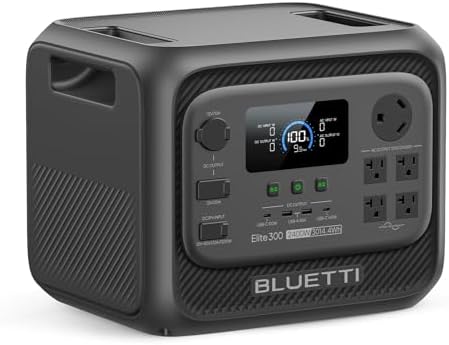
- [Compact 3kWh Power — Verified by Frost & Sullivan] – Elite 300 packs a full 3014Wh capacity into an ultra-compact desig…
- [RV-Ready with TT-30 Port & 12V/30A DC Output] – Designed for RV power systems, Elite 300 includes a TT-30 RV outlet and…
- [Reliable Home Backup Power for Outages] – Be prepared for unexpected power outages. With 3014Wh capacity and 2400W outp…
Confirm that you can store, charge, and handle this exact unit. Capacity is useful only when the practical setup works for your household.
5. UDPOWER S1200
The S1200 lists 1,200W output, 1,800W surge, and maximum 400W solar input. Start here if you’re comparing an appliance’s startup requirement with its normal running load, but verify the allowed surge duration.
Capacity isn’t in the validated title, so we can’t give it a runtime estimate. It’s a poor fit for a buyer treating 1,800W surge as continuous power or expecting the solar-input maximum to describe winter charging speed.

- 1200W Pure Sine Wave AC + 1800W Surge – Power Your Essentials: ✔Run refrigerators (600W), CPAP machines (50W), and even …
- 4,000+ Cycles LiFePO4 Battery – Outlasts Competitors by 3X: ○Most power stations use cheap lithium-ion (500 cycles) – ou…
- 14-Port Charging Hub – Most AC Outlets in Its Class: ✔5 AC outlets (vs. 2-3 in competitors) + 2x 100W USB-C PD . ✔Charge…
The listing mentions UPS and UL2743. We haven’t independently verified certification or transfer-time behavior. Don’t treat those words as proof of medical-device suitability.
Black Friday tip: if you shop holiday sales for a portable power station, compare capacity (watt-hours), continuous output (watts) and surge rating against the worksheet below, allowing for some conversion loss, not the size of the discount, and check the current price on Amazon. A smaller model on sale is not a deal if it cannot run what you need during an outage. Keep it with the rest of your home emergency kit.
Buying guide: build an essential-device worksheet
Typical planning ranges—check your device label and manual. These are broad examples, not measurements of your equipment or promises that a station supports it. Fast chargers, gaming laptops, larger fridges, and heated accessories can fall outside these ranges.
| Device | Illustrative running load | What to verify |
|---|---|---|
| Phone charging | 5–20W per phone | Charger and charging stage |
| Wi-Fi router | 5–20W | Modem may need separate power |
| LED lamp | 5–15W | Count each lamp |
| Laptop | 30–100W | Workload and charging demand |
| CPAP | 30–90W as a planning example | Ask supplier; heated accessories vary |
| Full-size refrigerator | 100–250W while compressor runs | Higher startup demand; cycles on/off |
The CPAP row isn’t a recommendation to rely on a generic station. Ask your supplier about the exact device, humidifier, heated hose, approved adapters, and backup requirements. Keep a device-specific plan from your care team.
Example 1: router, two phones, and two lamps
Assume a router draws 10W, two phones draw 10W each while charging, and two LED lamps draw 10W each. Together that’s 50W. For a hypothetical 1,000Wh battery, assume an illustrative 85% usable fraction: 1,000Wh × 0.85 ÷ 50W = 17 hours.
The 85% figure is a calculation assumption, not a tested efficiency for any listed model. Phones don’t necessarily charge continuously, but modem power and other loads may add demand. Actual runtime depends on ports, idle losses, battery condition, temperature, and usage.
For an eight-hour target, that same constant load needs 50W × 8h = 400Wh delivered to devices. Under the same illustrative assumption, the nominal capacity calculation is 400Wh ÷ 0.85, or about 471Wh. Leave extra margin rather than choosing exactly that capacity.
Example 2: a refrigerator that cycles
Suppose measurements or reliable device-specific information show a fridge averaging 60–80W across its cycles. With the same hypothetical 1,000Wh battery and 85% assumption, 850Wh ÷ 60W is about 14.2 hours, while 850Wh ÷ 80W is about 10.6 hours. That’s roughly 10–14 hours for this illustration, not a claim about every fridge.
The average isn’t the compressor’s running wattage and doesn’t describe startup demand. Before relying on the calculation, confirm the station can start the compressor and measure the fridge’s actual energy use over a representative period. Room temperature, door openings, defrost cycles, and other loads change the result.
If you don’t know the average, don’t substitute the low end of the table just to get an attractive number. Use the appliance’s own data or an appropriate energy meter, then plan for uncertainty. During an outage, running only the selected essentials gives a clearer energy budget than adding devices as you go.
Write down each device, running watts, startup demand where applicable, and required hours. Multiply constant watts by hours to estimate energy, then add the loads. A refrigerator cycles and has startup demand, so its label alone doesn’t establish runtime.
Leave room for losses rather than planning to use every nominal watt-hour. Ask the manufacturer about your exact appliance pairing when requirements aren’t clear. Reducing the load list can be more practical than purchasing a larger battery.
Count usable outlets and confirm each port’s limits. A connector that physically fits doesn’t establish electrical compatibility. Check the exact manual for continuous output, supported charging sources, temperatures, storage, and ventilation.
A solar-input maximum isn’t a guaranteed winter recharge rate. Check panel specifications, connector requirements, input voltage limits, and included accessories. Decide how you’ll recharge during a prolonged outage before buying.
Safe operation and winter planning
A battery power station doesn’t burn fuel or produce combustion exhaust during normal operation. Unlike a fuel-burning generator, it can be used indoors where its manual permits. Jackery explains this no-exhaust distinction; follow the exact model’s ventilation, clearance, moisture, and temperature limits, and don’t cover its cooling vents.
No combustion exhaust doesn’t mean a damaged battery can’t smoke or overheat. Stop using a unit that shows damage or abnormal behavior and follow its safety instructions. Indoor use also doesn’t authorize improvised connections to home wiring.
Charge and operate the station only as its manual allows. Check exact model and serial numbers against CPSC recall notices. This guide doesn’t certify any product as recall-free.
Don’t connect a portable station to a wall outlet to energize home wiring. Connections to building circuits need an approved arrangement and qualified electrical advice. Use supported individual-device connections.
If your plan also includes a fuel-burning generator, review our carbon monoxide detector guide. Generator placement precautions differ from battery-station operation.
Read our space heater safety guide before adding heat to your load list. Being able to run a heater briefly doesn’t establish useful overnight heating capacity.
Frequently asked questions
What size portable power station do I need?
Choose from your simultaneous watts, startup requirements, and required hours. A model name can’t settle all three.
Can it run a refrigerator?
Possibly, if the exact station supports running and startup demand. Check the specific pairing and expected cycling behavior.
Are watts and watt-hours the same?
No. Watts describe power; watt-hours describe stored energy. Compare both.
Are solar panels included?
Not necessarily. Confirm the exact bundle and compatible panel specifications.
Can it back up my whole home?
Don’t assume so. A portable unit for individual devices differs from a designed home-backup installation.
Is it suitable for medical equipment?
Get a device-specific backup plan from your equipment supplier and care team. Don’t rely on a generic roundup.
Choose for essential devices first
Map the devices you need, calculate energy requirements, and check exact manuals. Then compare the current listings and bundle contents in the cards above. Choose a station that fits your loads, duration, recharge plan, and household handling needs.